Changelog

Follow new updates and improvements to More Good Reviews.

August 12th, 2026

We’ve been shipping steadily since our last update. Here’s what’s new in the product.

Live in Claude’s connector directory

More Good Reviews is now listed in Claude’s connector directory, so connecting is a one click install instead of pasting a custom MCP URL.
Connect More Good Reviews in Claude →

Assistants can now do more once connected, including creating reviews right from Claude (matching or creating the customer by email or phone). Those reviews land in your project and can show up on your widgets and Showcase, so you can add social proof without leaving the chat. They can also work with customer photos and set review location and source.

Sentiment analysis

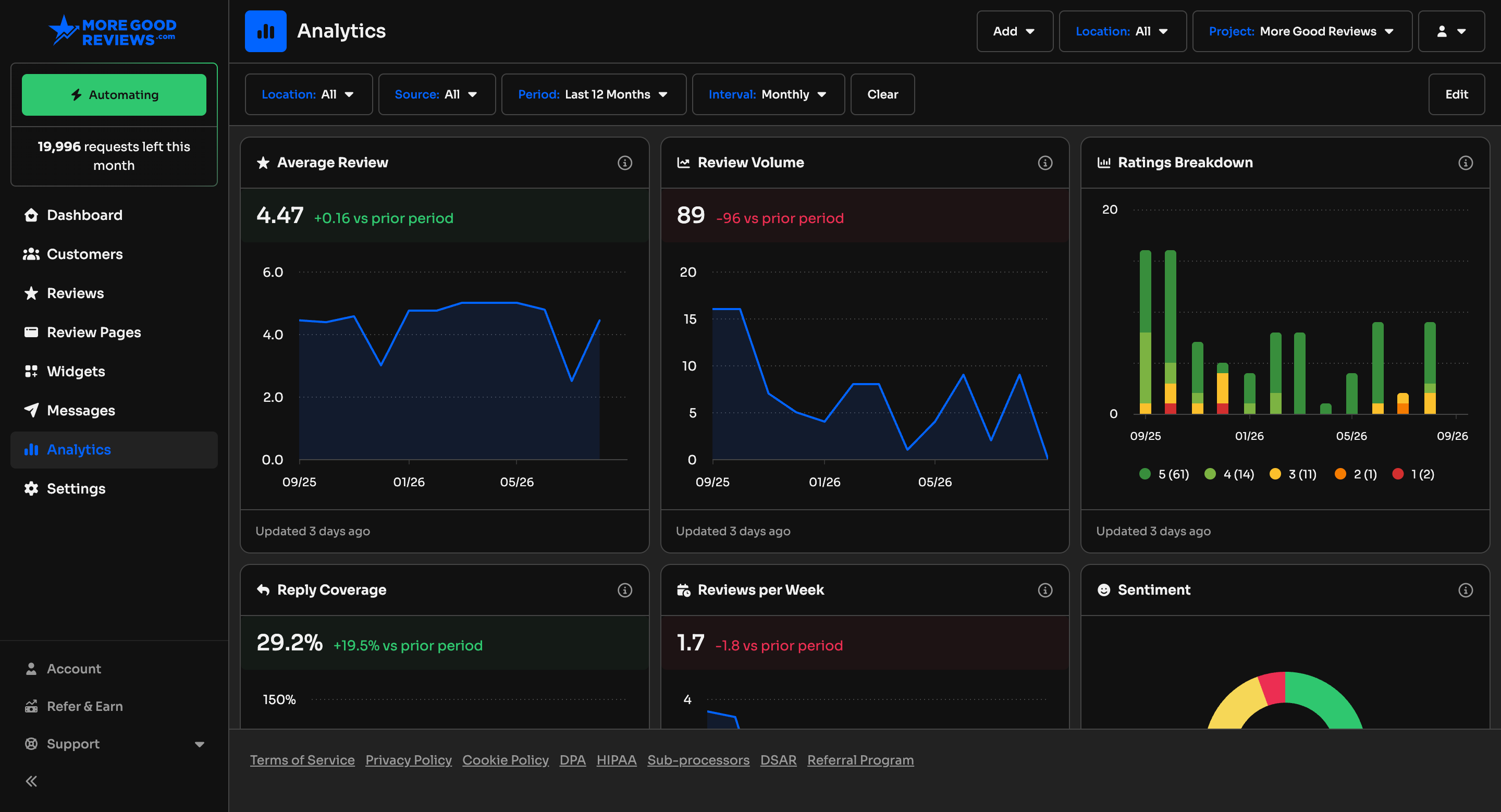
Star ratings don’t always tell the whole story. We now score the tone of each written review and show it as a sentiment meter next to the rating. You can sort reviews by most positive or most negative to find praise worth featuring, or feedback that needs a reply.

Sort widgets & Showcase by newest or most positive

When you’re curating what the public sees, you can now sort widget and Showcase reviews by newest first or most positive first, handy when you want fresh feedback or your strongest social proof up top.

Rich text reviews

Reviews can include basic formatting (bold, links, and more). That formatting carries through to your widgets and Showcase, so testimonials look closer to how your customers wrote them.

TextLink SMS

You can send review requests over SMS with your own TextLink account. It uses your paired Android phone as the gateway, so you don’t need 10DLC / A2P registration. Connect it under project Integrations.

Agency portal SSO

Agencies can let invited clients and team members sign in to the white label portal with their company login (Auth0, Okta, Azure AD, and similar). You can optionally require SSO so email and password sign in is hidden on the portal.

Also shipped

  • Guided project setup with Google connect and a clearer checklist

  • Faster widget loading

  • Star style and spacing controls in the widget builder

  • Review page success messages you can customize per star rating

  • AI overview refreshes when new review embeddings are ready

  • Badge, Headline, and Faces widgets: choose whether the average rating shows as one decimal (4.9) or two (4.94)

  • Clearer custom domain (CNAME) setup and SSL status warnings

  • Load more pagination on heavier lists

  • Alerts when space members accept invites

  • Support links grouped in the sidebar

Questions or feedback? Just reply to this email. We read every one.

Thanks for building with us,
The More Good Reviews team

June 30th, 2026

It's been a busy few months behind the scenes, and I'm excited to finally share what we've shipped. Some of these are features I've wanted to build for a long time. Here's what's new.

🎉 Get paid to share: Introducing Refer & Earn

You already tell people about us (thank you!) — now you can earn for it. Our new Refer & Earn program pays you a recurring commission every time someone you refer becomes a paying subscriber.

  • Earn 30% recurring commission on every payment from customers you refer — for the lifetime of their subscription, not just the first month.

  • Easy to share: grab your personal referral link from the Refer & Earn tab in the sidebar, or share it straight to LinkedIn, Facebook, WhatsApp, X, and more.

  • Simple payouts: connect your bank account, and we send your earnings once your approved balance reaches $50.

A few things worth knowing: your lead needs to sign up within 90 days of clicking your link, commissions are earned once they're a paying customer (trials don't count until they convert), and there's a short 30-day hold before each commission is approved. Full details are in the Referral Program Terms on the page.

Start earning →

👍 Keep your Facebook reviews in sync

You can now connect your Facebook Page directly to More Good Reviews and keep your reviews flowing in automatically — no more one-off imports.

  • New Facebook reviews and recommendations sync into your dashboard on their own.

  • Since Facebook uses recommendations rather than stars, they come in as 5 stars (recommended) or 1 star (not recommended).

  • Heads up: Facebook doesn't share reviewer names with us, so those reviews come in without a customer name attached.

  • Reply to Facebook reviews right from MGR, alongside your Google reviews.

  • Everything shows up in your widgets and showcase, filterable by source.

Connect it under Settings → Integrations → Facebook.

⚡ A rebuilt Zapier integration

We rebuilt our Zapier integration from the ground up, so More Good Reviews now connects to thousands of apps with far more power than before.

  • Triggers: kick off a Zap on a new review or a new customer.

  • Actions: create customers, schedule review requests, log charges, reply to reviews, update tags and visibility, and look up your data — over 40 actions in all.

  • Smart filters: narrow triggers by location, source, score, tags, and date.

Connect in minutes — copy your API key from Settings → API, then head to zapier.com/apps/more-good-reviews/integrations to get started.

🤖 Put your reviews to work with Claude

For those of you using AI assistants, we've released a set of Claude skills that turn your review data into action. Connect your project's MCP Server (Settings → MCP Server), add the free skills from github.com/moregoodreviews/mgr-skills, and just ask:

  • Reputation Report — a clear health check on your reviews, ratings, reply coverage, and trends.

  • Action List — a prioritized to-do list of the highest-impact things to fix next.

  • Review Pipeline — finds customers to ask for reviews and schedules requests (always with your approval first).

See the skills documentation for setup and details.

Smaller updates worth knowing about

  • Per-location logos on review and kiosk pages for multi-location brands

  • A smarter review overview with clearer trend-strength indicators

  • Richer “new review” emails that now include location, source, and customer contact details

  • Built-in cookie consent with flexible EEA/global controls

  • Every new project now starts with a location, so you're set up and ready to go faster

  • Agencies can now create projects without sample reviews for a cleaner start

As always, thank you for being a customer. I'd love to hear what you think.

Cheers,
Scott - Founder, More Good Reviews

May 4th, 2026

A new way to bring AI into your workflow: the MCP Server

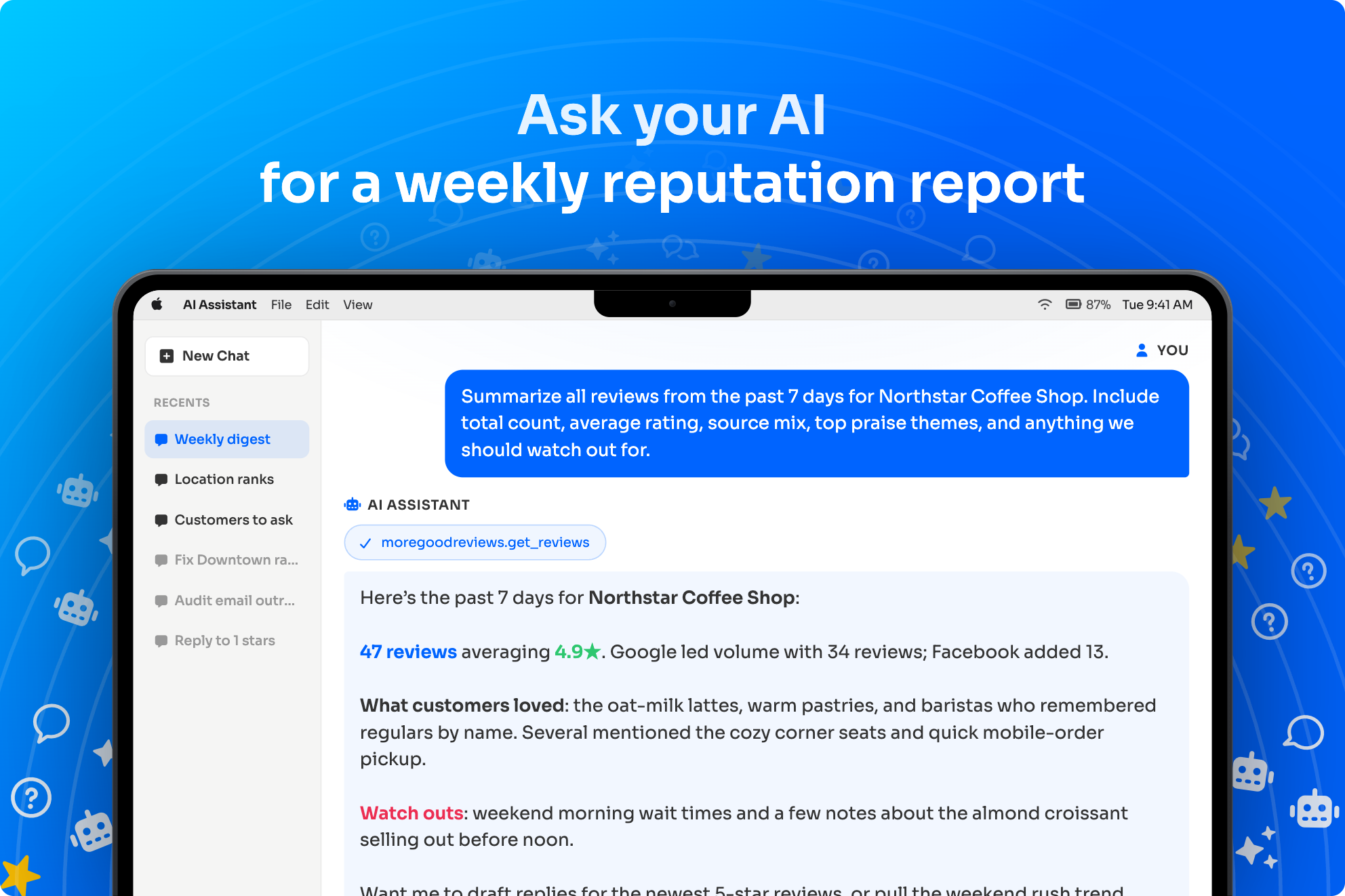
You can now connect AI tools you already use, like Claude, straight to your More Good Reviews account. We call this the MCP Server. Once it's connected, you can ask the AI to do everyday work for you: Add a new customer, summarize recent reviews, and compare performance by location, all using the data that's already in your account.

You stay in control the whole time. The AI can only see what you allow, and you can review or remove any connection from Settings → MCP Server. If you sign in through your agency's branded site, the connection screens follow your branding too.

How to connect: open your AI app's settings, follow our MCP / Claude setup guide, sign in when prompted, and you're done.

Try it with our starter prompts

Not sure what to ask? Once you're connected, head to Settings → MCP Server and scroll to Example Prompts. We've included a handful of ready-to-go prompts you can copy with a click and paste straight into your assistant — a fast way to see what's possible without coming up with the wording yourself. The current set covers:

  • Send review requests in bulk — schedule requests for customers who signed up in the last 30 days and haven't been asked yet

  • Add a customer and request a review — onboard one new customer and queue an email request with reminders

  • Find customers to ask for reviews — list up to 50 candidates, newest first, skipping anyone unsubscribed

  • Weekly review digest — a 7-day summary with counts, averages, top themes, and top concerns

  • Compare location performance — a 90-day leaderboard across your locations with trend flags

  • Audit outreach delivery health — delivery, open, click, and failure rates for the last 14 days

Open the prompt that's closest to what you want, copy it, paste it into your assistant, and tweak the wording if you'd like — they're a starting point, not a script.


The Project API keeps growing

Our Project API — the one your developers use to automate one project at a time, has gotten significantly more capable in the past few months. There are many more things you can do from code now: working with customers, reviews, messages, locations, tags, and review sources, with stronger filters, useful actions, and moderation flags. Day-to-day, you'll keep working in Reviews and Customers like always. This is the API that powers integrations and the new MCP / Claude experience above.


A new Agency API for partners and large teams

If you run an agency, you can now build your own tools and automations against More Good Reviews instead of clicking through the dashboard for every task. The Agency API can list your clients, the sections they're grouped into, your team members, invites (including resending one that didn't go through), the external links you've saved, and project overrides that your contract permits. There's also project duplication, so a new client can start from a tested template instead of a blank page.

Your developer uses the API key from the agency settings (alongside your other API options). They'll find everything they need, like endpoints, examples, security tips, in the Agency API documentation. If you only manage a single business, you can safely skip this section.


AI Assistant: automatic highlights on your reviews

Long reviews are great, but they're easier to use when the best parts stand out. Our AI Assistant can now read your reviews and pull out the most meaningful phrases as highlights. These are the bits that catch a visitor's eye on your widgets and review pages, and they help your team scan a busy inbox of feedback at a glance.

Highlights are turned on and tuned under Settings → AI Assistant (look for the AI Highlights section). You can also adjust them on a single review when you'd like a different emphasis.


AI Ask: get answers from your reviews, in your own words

Sometimes you don't want to read a hundred reviews, you just want to know what people are saying. AI Ask lets you type a question in plain language and get a short, direct answer based on the reviews already in your account. Things like "What do customers love about us?", "What complaints come up most?", or "How do people describe our service?" — without exporting anything.

You'll find it on the Reviews page: click the search icon in the toolbar to open the search/ask bar, type your question, and click Ask. The answer appears right under the bar, with little links you can tap to jump to the actual reviews it pulled from. If you'd rather just search review text, the same bar has a Search button.

Anyone on your team can use AI Ask without installing anything. It's separate from the MCP Server above (that's for outside AI apps like Claude); AI Ask lives inside More Good Reviews.


Smaller updates worth knowing about

  • Bulk tagging — Apply the same tag to a lot of reviews in one go from the Reviews list, or tag from a single review.

  • Similar reviews — Open any review and you'll see a Related Reviews panel showing other reviews in the same project that mean something similar — handy for spotting themes or drafting a reply.

  • Cleaner Reviews list — Likely duplicates are now hidden by default on the Reviews page; switch the filter to duplicates when you specifically want to review them.

  • More than one QR code per review page — On a review page (the page customers fill out), you can now save several QR codes — one per location, table, campaign, etc. — and print or download each one separately.

  • Multiple email signatures — Under Settings → Signature, set up different signatures for different people, locations, or tags, and the right one gets used in your outreach.

  • Customer imports include unsubscribe dates — When you upload a customer CSV, you can include an unsubscribed_at date so people who already opted out stay opted out.

  • More languagesNorwegian ("Norsk") is available as a language; pick it from the language selector in Account → Settings.

March 12th, 2026

Export reviews as images

Turn your best customer feedback into polished review cards you can share on social media, your website, or in marketing. Pick any review, customize how it looks, and download it as a high-quality image.

  • Choose from three sizes: square (1:1), portrait (4:5), or story (9:16)

  • Customize colors, fonts, and layout so each card matches your brand

  • Show or hide the header, star rating, customer name, company, avatar, review source, and date

  • Edit the review text before exporting

  • See a live preview before you download

Open any review from your Reviews page, click the share icon in the actions bar, and use the Share modal to design and download your review card.

Build your reputation with review cards

Review cards make it easy to highlight customer feedback and strengthen your business profile. Use them in ads, on your site, or in emails to show real ratings and testimonials.

Where to find it

Shares is available from the Reviews page. Open a review, then click the share (image) icon in the actions bar to open the Share modal.

Coming soon: Share presets

We’re adding presets so you can save your favorite settings (colors, fonts, layout, and visibility options) and reuse them for any review. Create a preset once and apply it with one click whenever you export a new review card.

February 19th, 2026

AI Auto-Tagging

You can now auto-tag your reviews with a simple instruction, for example, you can create a tag named “Difficult” with the instruction: Apply this tag to reviews that mention the product was difficult to use or understand.

That’s all there is to it! Once you save you tag, we will automatically apply it to any review that comes in for your project. No need to manually tag your reviews. And you can apply new or existing tags to reviews already in your project by checking off the box to automatically apply the tag to existing reviews.

Backfilling reviews with tags could take some time. All project admins are notified when the backfills are completed.

Note: We have deprecated the “Auto-Tags” feature in favor of this new approach. If you were using that feature, you will need to add/update your tags to use AI Auto-Tagging.

Call-to-Action Selector for Review Requests

You can now use either a rating selector OR a button as the call-to-action in review requests and reminder emails. Switching to a button may improve deliverability, since there will be less links and HTML in your emails, but you won’t get the immediate feedback from the customer, since they will still need to select a rating once they are taken to your review page. To try this, go to Settings > Email, and scroll to “Call to Action”.

Mark Reviews as Replied

For reviews that cannot be publicly replied to, you can now set a status on the reply to indicate you have handled the feedback privately. This option is available in the Reply box when editing a review.

Other Improvements

  • Added Finnish and Japanese languages, bringing the total number of languages we support to 15!

  • System alerts are now localized to the user’s language.

  • Added a location field to Slack and Discord alerts, letting you know which location the review was submitted for.

  • AI overviews on the Dashboard and Reviews page now change with the location selector, giving you summaries and trends per location, when toggled.

  • Updated the Customers page to show more details at a glance.

January 1st, 2026

Happy new year! 🎉 We’re kicking off 2026 strong with a brand new update!

Customer Tags

You can now add tags to customers as well as reviews, making it easier to organize and segment your customer base while also attributing customer acquisition to specific employees.

To tag a customer, first create a new Customer Tag in Settings > Tags. Optionally assign an icon and color to it. Then, assign the tag to the customer by:

  1. Viewing a customer profile and clicking Edit Customer.

  2. Including a comma-separated list of tag slugs under the tags column in a CSV upload.

  3. Including an array of tag slugs when adding or updating a customer via the REST API endpoint.

Customer tags will be visible on the newly designed customer profile header. Customers can also be filtered on tags using the new Tag filter on the Customers page.

Customer Notes

You can now add notes (for internal use only) to your customer profiles. Simply view a customer profile and click Edit Customer. You’ll see a Notes section in the modal. You can also click on the Notes field in the newly designed customer profile header. Like tags, you can add notes 3 ways: manually, via CSV upload using the notes field, or when adding or updating a customer via the REST API endpoint.

You can also filter customers using the new “Has Notes” option on the Customers page, and easily spot customers with notes by the sticky note icon displayed near their name in the list.

What should we build next?

Remember, you can always vote on features or suggest your own, here.

December 23rd, 2025

Introducing “Retries” as part of your automation strategy

You can now retry the full review request and reminder sequence after a wait period. Previously, you had one automated chance to request a review, with up to 3 spaced reminders. Now, if that didn’t result in a review, Retries let you continue asking in a way that avoids annoying the customer. Here’s how it works:

  1. Select the number of times you want to retry the full request and reminder sequence. Choose between 0 and 2 attempts.

  2. Set the number of days to wait (wait period) after the last sequence completes before sending a new one. You can choose between 14 and 90 days.

  3. Turning Retries on retroactively applies a 90-day look back, making any customer who received a review request but didn’t leave a review in the past 90 days eligible for another request.

You can find Retries in Settings > Strategy > Retries. We have also broken down the strategy explanation into sections in the automation modal when enabling or disabling Automated Review Requests to make it easier to understand.

Custom instructions for AI-generated reviews and replies

You can now add your own custom instructions for generating reviews and replies with AI in the AI Assistant settings. These instructions are appended to our own internal ruleset prior to making the request to OpenAI.

Addresses on customer profiles

You can now add a customer address manually by editing their profile, via CSV upload, or with the REST API. You can also search your customers using the address fields, as well as by name, email address, phone number, company, and general query.

Download your DNS records

You can now download DNS records for both project and agency domain setups as a CSV file, making it easy to share with a web developer and add the entries to your domain registrar. You can find this option on the bottom of the Domain page in project and agency settings.

Pre-fill form fields with query parameters

You can pre-fill form fields by adding query parameters to your review page URLs. You can do this for first_name, last_name, email, and phone. For example: “?first_name=Scott”. This is useful if you are using an external service to email your review requests to customers, and you have the ability to dynamically alter the links before sending.

List-Unsubscribe header is now optional

You can now remove the List-Unsubscribe header in your review request emails. This header lets customers quickly unsubscribe via a native button in their email client. While it’s important for deliverability, compliance, and easy opt-outs, you now have the option to exclude it. You can find the setting in the Email section of your project settings.

Additional platform improvements

  • Added Ukrainian (uk) as a language option. We now support 13 languages!

  • Reduced redundant link tags in review request emails to improve Primary inbox placement.

  • Added a Font Emphasis option, currently used in the Headline widget.

  • Added ability to manually add an external URL on reviews.

November 18th, 2025

Email sending enhancements

You can now send emails from either your root domain or the full domain added in Settings for your project or agency when not using SMTP. Since we require a subdomain—like “reviews” or “agency”—there’s been mixed feedback on whether to use the subdomain in the email address or stick with the root domain. Now, you can select your preference in the Email settings for either a project or an agency. Scroll down to Sender Email Address, and if you have a connected domain, you’ll see an option to toggle between domains. We are defaulting to the root domain.

We updated our List-Unsubscribe header to use an email address AND a URL for one-click unsubscribe. The new unsubscribe email address will work for all projects using our sending domain or one connected via the standard setup.

Editable custom field answers

All custom field answers on a review are now editable, and you can add additional answers when editing. This is available only for reviews linked to a review page. When editing such a review, you can add, update, or remove answers for any custom fields applied to that page.

New dynamic widgets

We added 2 new “dynamic” widgets. The Carousel and Corner widgets both require you to manually add reviews to showcase. You can now choose the Dynamic Carousel and Dynamic Corner options. These widgets will showcase your most recent X reviews based on your filters without having to manually update the reviews displayed in your widgets.

Dark mode agency assets

Agencies can now upload a logo and icon specifically for users who enable dark mode on their dashboard. To add them, go to Appearance in the Agency settings.

Delay setting for AI replies

If AI replies are enabled in your AI Assistant settings, you now have the option to select a delay to not make it so obvious the reply is automated. Choose between the following options:

  • Minimal Delay (default)

  • Wait at least 3 hours

  • Wait at least 6 hours

  • Wait at least 12 hours

  • Wait at least 24 hours

Additional platform improvements

  • When reviews are filtered, the stats will also reflect the filters for date range and tags.

  • Added a project strategy setting to expire the review page links sent to customers.

  • Redesigned review edit modal and page to call attention to replying (for Google).

  • Added a showcase setting to NOT use filters applied to the reviews shown in the aggregate star rating, revealing the unfiltered star rating.

  • Added new API endpoints for creating and updating locations on projects.

  • Increased upload limit for all image assets to 5mb.

  • Added Serbian language (sr). We now support 12 languages!

October 15th, 2025

Send SMS with ClickSend or SimpleTexting

We added 2 new options to send SMS from More Good Reviews, in addition to the Twilio integration option. You can now select ClickSend or SImpleTexting from the SMS category in the Integrations section. These 2 services offer a quicker and easier way to get started with SMS, and they are both offered by Sinch (owners of Mailgun), the same company we use and trust to send your emails.

For more information on how to get started with these services, check out our docs:

Custom rating icons

You can now customize the rating icons with any image you like by going to Settings > Ratings and scrolling down to the Custom Icons section, where you can upload a unique image for each of the 5 ratings. This lets you tailor your review pages and email templates to match your branding—use a face icon or any design you prefer.

Cancel and reschedule messages

We’ve updated how messages appear on customer profiles. All messages — including canceled ones — are now visible. A message is typically canceled when a customer clicks a link in an email or leaves a review. Canceled or scheduled messages can be rescheduled for a later date, while any other message can be deleted. Check out the Actions button on each message for available options.

New 9th widget option

Added support for a 9th widget option — a “Corner” widget — that displays a rotation of reviews in the bottom left corner of your website. Once selected, add a few reviews to the widget in the widget builder by selecting Reviews in the sidebar to see it in action.

Custom fonts on review pages and showcases

You can choose either a system or Google font for your review pages and your showcase. The font selector is located in each section’s Appearance settings. For review pages, edit a review page and click Appearance in the sidebar. For showcases, go to Settings > Showcase and scroll down to Appearance.

Webhook events for messages

When editing your webhooks, you can now choose which events to subscribe to by selecting or deselecting them. We’ve also added new message-related events, bringing the total to six.

  • Reviews - created, updated, deleted

  • Messages - created, updated, deleted

Generate QR codes with tags

You can now add tags to QR codes for your review pages. In each review page’s QR Code section, you’ll find a tag selector. Choose one or more tags, then download the QR code. When customers scan it, their reviews will automatically include those tags. This is especially useful if you would like to attribute reviews to your employees.

Other enhancements

  • Added {{full_name}} and {{current_year}} variables to email and sms templates.

  • You can now explicitly set a language for a widget by clicking on Actions > Settings in the widget builder for the widget. This will not change the language of the actual reviews.

  • GMB integration is now displayed when editing a location, to let you know that location has an attached integration and reviews are being synced with it.

  • You can now send review notifications to multiple email addresses. To set this up, edit a review page, click Settings in the sidebar, scroll to the Notifications section, and enter one or more email addresses.

  • Agencies can now set limits on the number of widgets and project members for each project, and also control access to the API and webhooks.

  • If an email validation check comes back as “unknown”, we now show a grey question mark next to the email address, but the email will still be sent as if it were valid.

September 6th, 2025

Introducing Review Highlights

You can now highlight key phrases in customer reviews. Highlights will be visible on widgets and showcase pages to draw attention to the most important parts. To highlight text, simply click into a review from the Reviews page to edit it, select part of the written review, and click on the background color icon. There are several colors to choose from.

Marquee Widget

Added a new marquee widget that continuously animates a strip of reviews from right to left. You can edit how many slides you want to be visible at any time, as well as the duration of the animation.

Note: This widget uses a fixed height based on the tallest review. The same layout update now also applies to the Carousel widget.

Inherit Font Option for Widgets

You can now select the “inherit” option for the font family to use for your widgets, allowing the widget to inherit the font that is being using on the website it is embedded on.

“Powered by” Badge for Agencies

For agencies using our white labeled software, you can now display a “Powered by” badge on your clients’ emails to customers, review pages, showcase pages, and widgets. This new feature is turned off by default, but can be enabled on each project by clicking on Actions > Manage Overrides (formerly Manage Limits), and scrolling to the bottom of the modal.

You can edit the label of the badge, as well as the URL it links out to by visiting your agency settings page.

AI Reply Improvements

AI replies are now more varied, reducing repetition and ensuring responses don’t repeat the same phrasing multiple times in a row.

You can also now choose to only reply to positive reviews when enabling the Automate Replies feature in the AI Assistant settings.

Time Picker for Manual Requests

You can now choose the exact date and time to send review requests—whether from a customer profile, when adding a new customer, or when sending bulk requests from the Customers page.

Auto-Hide Negative Reviews

You can now set the default review visibility to “show only positive reviews” in project settings. While widgets and showcase pages already hide negative reviews by default, this setting adds extra assurance that negative reviews will never be shown publicly.

Customer Linking for Google Reviews

We are now linking customers to a Google review if a customer record exists for the reviewer’s name. This allows the Google review to show up on a customer profile if their review was requested via the platform.

Form Revealer on Review Pages

If you are presenting 3rd party links on your review pages, the feedback form used to appear above or below the links when the rating was positive. Now, the customer would need to click a button to provide direct feedback, as opposed to clicking on a 3rd party link.