Analytics, email validations, and more.
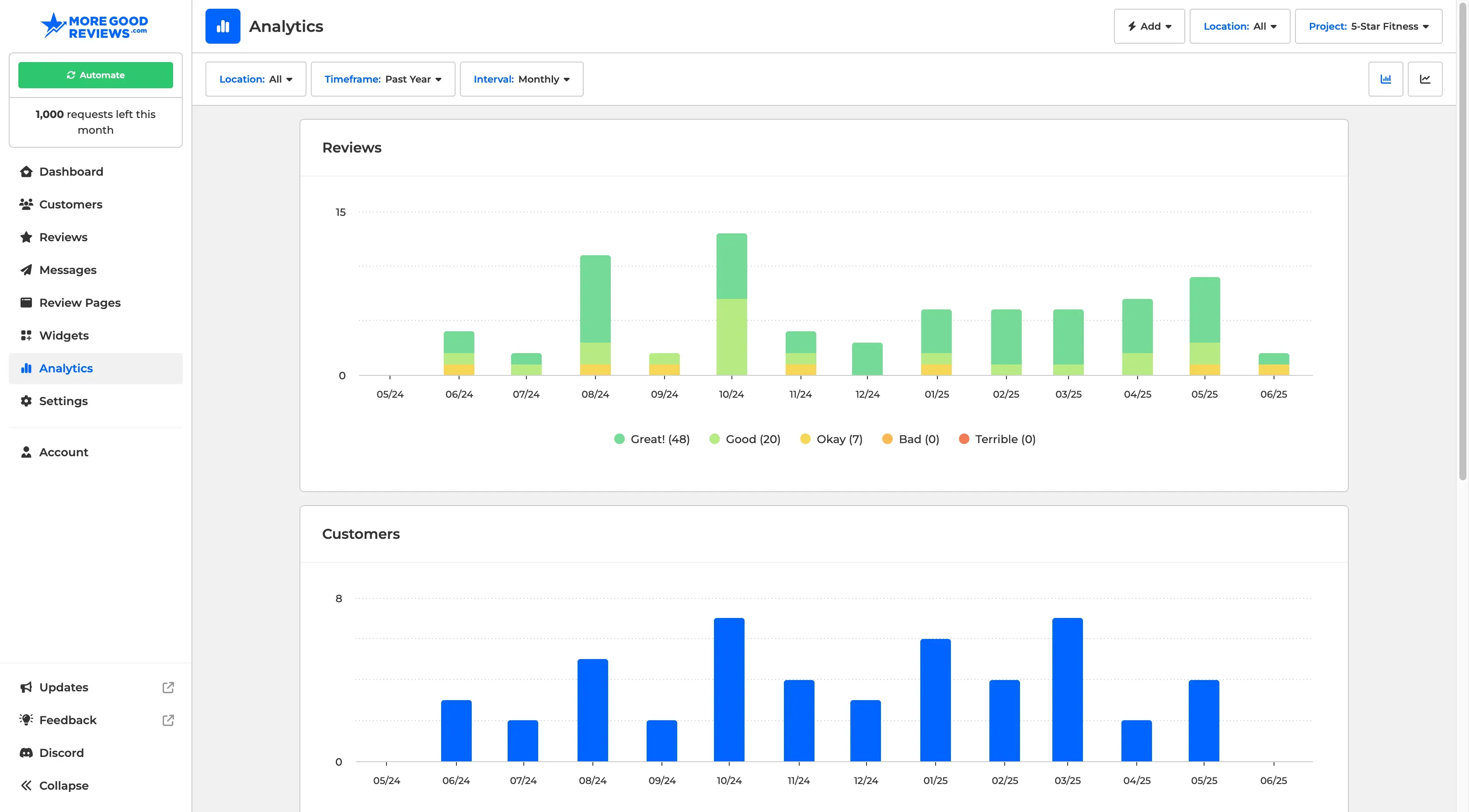
Introducing the New Analytics Page
The new Analytics page gives you a comprehensive overview of your project’s activity. At a glance, you can:
Track your overall ratings and how they trend over time.
See how many customers are being added and requested over time.
Monitor the volume of messages sent from the platform.
This bird’s-eye view helps you understand performance trends, identify opportunities, and stay on top of your outreach and reputation efforts.
Automatic Email Validation
We now automatically validate customer emails for you. Each project includes a monthly quota of email validations. We skip validation for trusted domains like gmail.com and yahoo.com. If an email fails validation, the message will be marked as failed and won’t be sent—helping protect your sender reputation.
If a customer email is validated, you’ll see a green icon for a pass and a red icon for a failure next to the email address.
Manual Email Validation
You can manually validate individual email addresses by clicking into a customer profile and selecting Validate Customer Email from the actions menu. Manual validations count toward a separate monthly quota from automatic validations.
Other Enhancements
If you select a location from the location picker on a review page, it will now replace the form used for the review page with the one that location uses. Useful if you are using 3rd party links and redirects for each location.
You can now set widgets to a published or unpublished state directly in the builder.
We now offer language support for both pt-BR and pt-PT.