Import reviews from any website, rebuilt analytics, design widgets with AI, and more
We’ve been busy this summer. Here’s what’s new!
Import reviews from any website
You can now pull reviews in from almost any public reviews page, not just Google, Facebook, Trustpilot, Yelp, or LinkedIn. On Reviews, click Add (or Import Reviews if the list is empty), open Quick Import, choose Other Website, and paste the URL. We import recent 1 to 5 star reviews from the last two years, with the name, photo, and text when those are on the page. You can limit it to 4 and 5 stars. It’s a one-time import, so it won’t keep syncing the way Google does (yet), and it only works on pages that don’t require a sign-in.
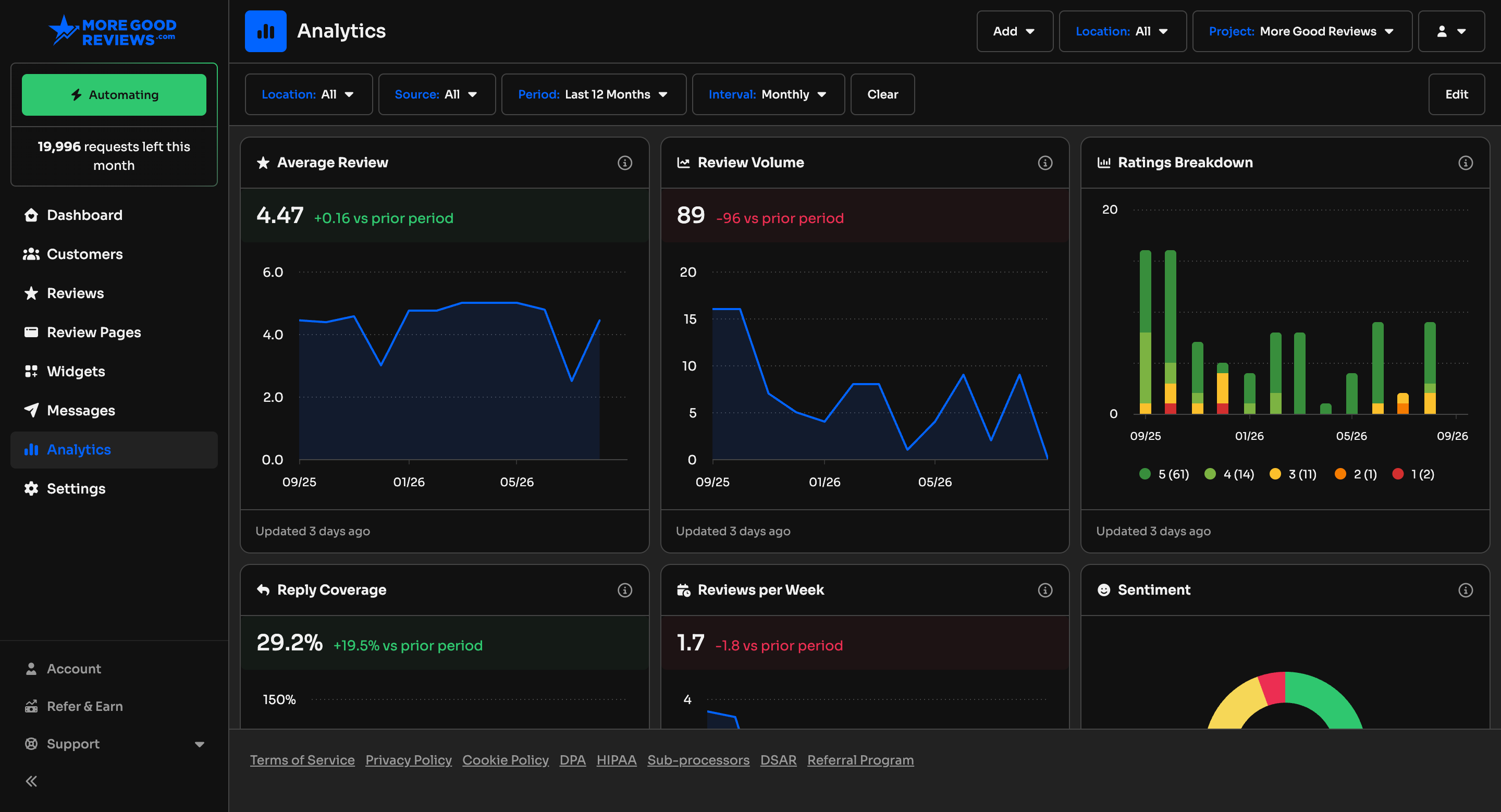
A rebuilt Analytics page
Analytics used to be three charts. It’s now a full page of cards that move together, so when you pick a location, a review source, or a time range, the whole page updates at once.
Here’s what you can see:
Your average rating, how many reviews came in, and how that compares to the last stretch of time
How many reviews you get in a typical week
How many reviews you’ve replied to
A breakdown of 5-star through 1-star reviews over time
How positive or negative the written reviews sound (that can differ from the stars)
Which sources the reviews came from, and the average rating for each
Your most-used tags, with counts and ratings
A location leaderboard, including how often each one gets 5 stars
1 and 2 star reviews from the last 3 months that still need a reply
Customers added, and customers you’ve asked
Messages sent, clicked, and ones that didn’t go through
How many review requests you’ve sent today and this month
A smaller version of the same cards lives on your Dashboard. Click View All to open the full page with those choices already applied. You can drag cards around, and we remember the order for that project. Overview trends on the Dashboard are cards now, with a short summary plus mixed positive and negative cards, instead of two lists. The first time you open it, we may need a minute to gather the numbers. After that, it should be ready whenever you come back.
Describe a look, apply it to your widget with AI
In the widget builder, you can now type the look you want and apply it. Ask for a whole new style, or something small like “make the corners rounded.” The preview updates right away, and your reviews stay put.
Match a QR rating to the public review
If someone rates on a QR page with no name, then leaves a matching Google or Facebook review a few minutes later, we treat that as the same visit. The public review gets connected to the guest rating, so tags and other details from that visit carry over.
A new Admin role
Need someone who can invite and manage the team without handing over the keys? Admin sits between Manager and Owner. Admins can invite people, update members below them, and change project settings. They can’t delete or duplicate the project.
Also shipped
AI settings now live under Settings → AI Tools, with separate pages for Review Suggestions, Replies, Highlights, and AI Tags
If your customer list is empty, you can add yourself first and try the flow before a real import
Download a customer import spreadsheet that already has your name and email as the sample row
Added an MCP Server tab to the import modals for Customers and Reviews
Agency projects no longer show Getting Started
Love what we’re building?
We set up a new G2 profile and your review helps support us. Please take a moment to write a review, and your next coffee ($5 gift card) is on us! Reply to this email when you’re done.
Thanks for being a customer,
The More Good Reviews team